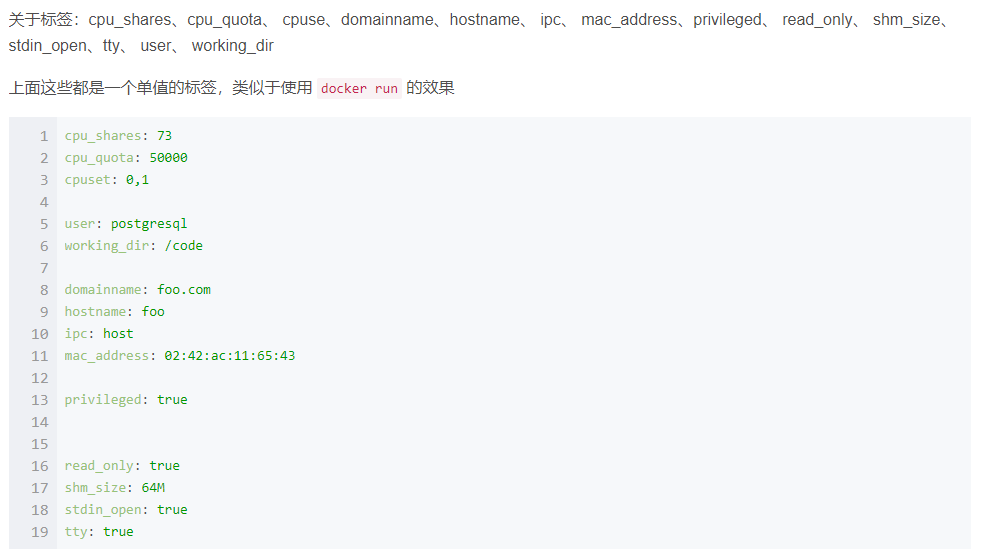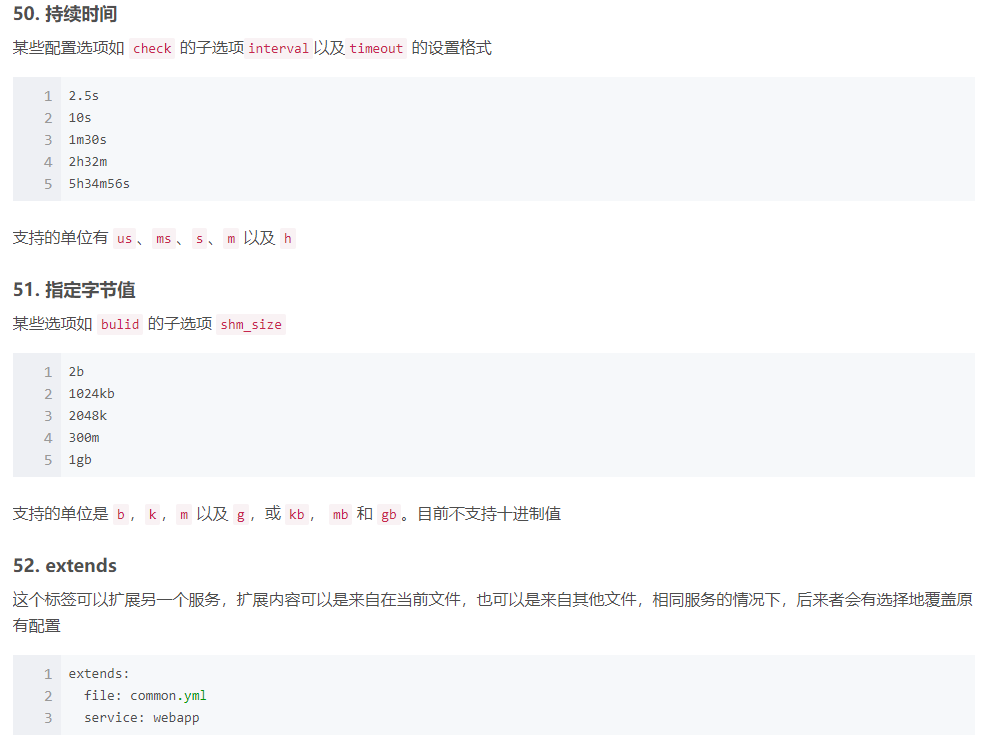
Ubuntu安装
- 官网下载VMware并安装
- 激活码
https://webcache.googleusercontent.com/search?q=cache:wZSMi6VH_agJ:https://www.jijibeng.com/archives/147.html&cd=2&hl=zh-CN&ct=clnk&gl=jp
- 激活码
- 官网下载Ubuntu 镜像文件
按操作步骤安装好Ubuntu
- 安装工具
apt install git- 安装docker
curl -fsSL https://get.docker.com | bash -s docker --mirror Aliyun
Ubuntu 安装docker遇到的问题
- 安装docker
- 安装docker-compose
docker imagespermission deniedsudo chmod 666 /var/run/docker.sock
docker
- docker
- docker命令大全
- 搜索镜像:
docker search centos - 下载镜像:
docker pull name[:tag]默认最新版本
- 查看镜像:
docker imagesdocker image lsdocker inspect name:v1docker history name:v1
- 给镜像添加tag:
docker tag xxx:1 xxx/xxx:3 - 删除镜像: -f 强制删除
docker rmi name[:tag]docker rmi imageIddocker image prune
- 创建镜像:
docker commit [options] container repository[:tag][options] -a 作者 -m 备注信息 -p 提交时暂停容器运行
- 导出镜像:
docker save -o xxx.tag repository[:tag] - 导入镜像:
docker load < xxx.tardocker load -i xxx.tar
- 上传镜像:
docker push name[:tag] - 拷贝文件:
docker cp /www/runoob 96f7f14e99ab:/www/本机 -> 容器docker cp 96f7f14e99ab:/www /tmp/容器 -> 本机
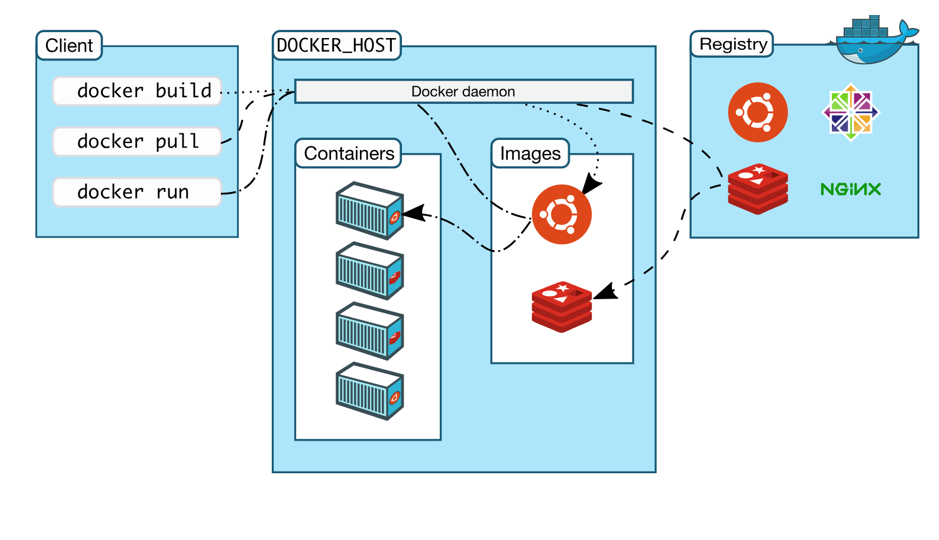
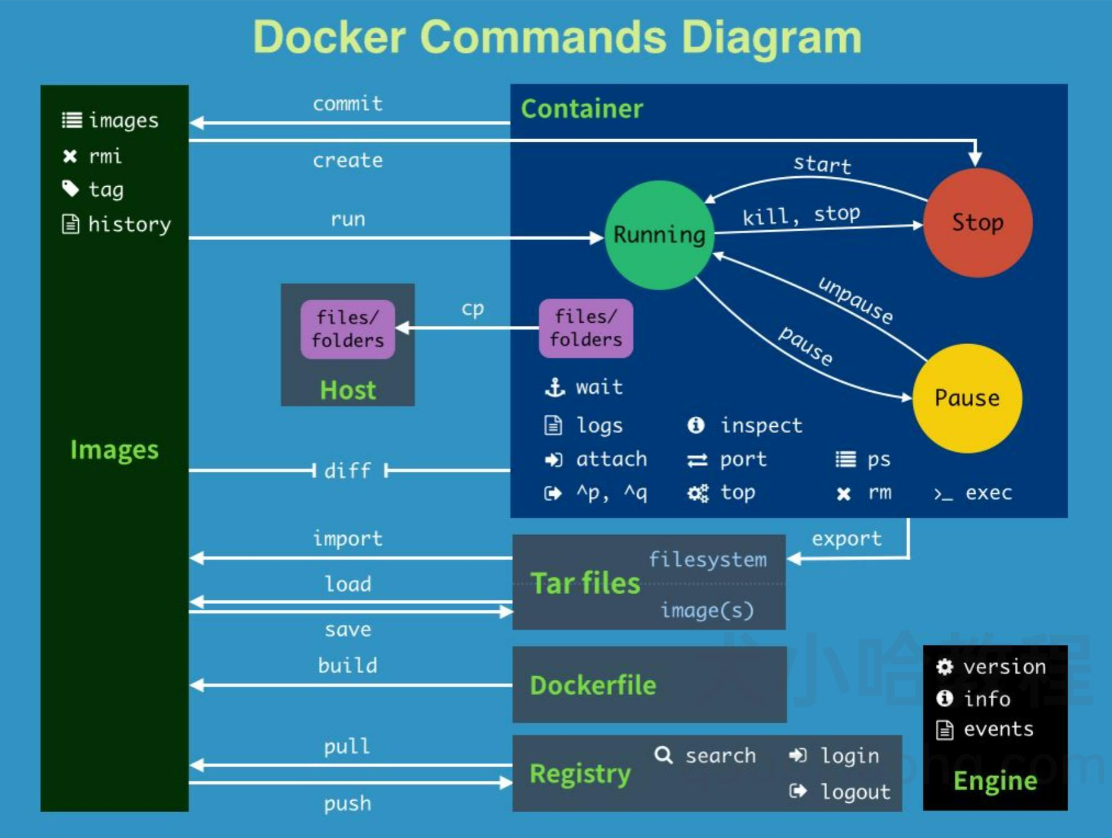
容器
- 查看容器
docker ps –adocker ps
- 运行/创建容器:
docker run -itd --name xxx name[:TAG]- -i 让容器的标准输入保持打开
- -t 分配一个伪终端并绑定到容器上
- -d 守护态运行
- –name 容器名称
- 创建容器:
docker create创建容器,停止状态docker start启动docker logs containerID查看容器输出信息ctrl+D或exit退出容器docker restart重新启动
- 终止容器:
docker stop containerdocker kill container不安全
- 进入容器:
docker exec -it containerID /bin/bash - 删除容器:
docker rm containerID/containerName - 导出容器:
docker export containerID > xxx.tar - 导入容器:
docker import xxx.tar repository[:tag]docker import URL
- 重启容器:
docker restartdocker restart xxx
- 其他:
docker run --help仓库
- dockerhub
- 注册dockerhub账号
- 创建仓库
- 本地登录
docker login - 本地构建好镜像
docker push
docker数据卷
- 特性:
- 数据卷可以在容器之间共享和重用;
- 对数据卷的修改会立刻生效;
- 更新数据卷不会影响镜像;
- 数据卷默认一直存在,即使容器被删除.
- 创建
docker volume create xxx
- 查看
docker volume lsdocker volume inspect xxx
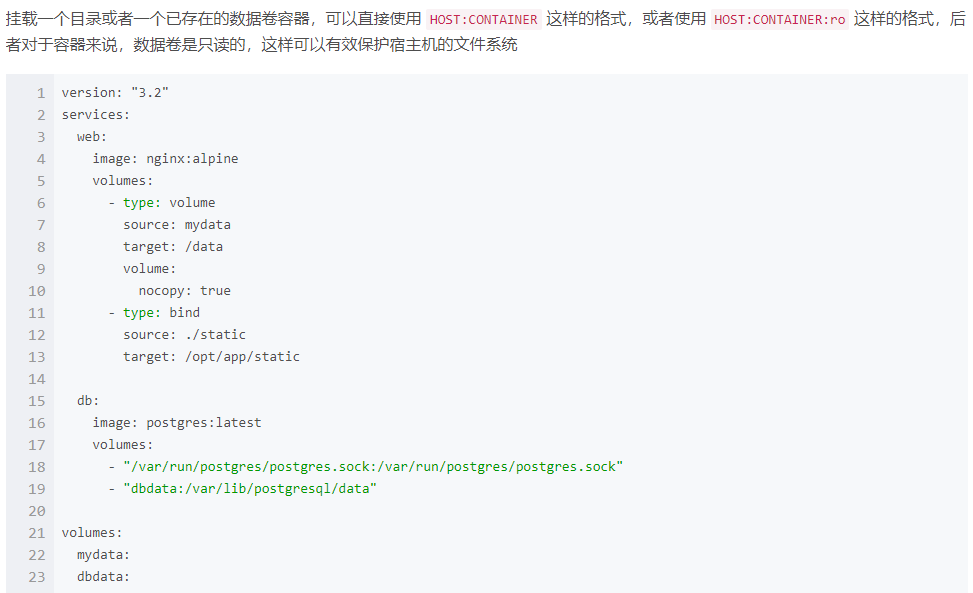
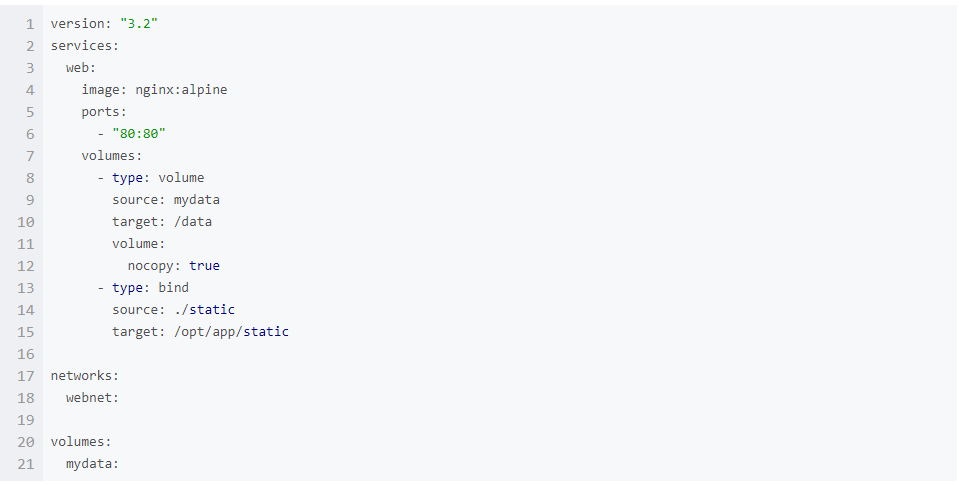
- 挂载
-v宿主机上没有指定文件不会报错,会自动创建指定文件--mount宿主机中没有这个文件会报错找不到指定文件,不会自动创建指定文件
- 删除
docker volume rm xxxdocker volume prune
- 数据卷容器
- 创建
docker run -d -v /dbdata --name dbdata training/postgres echo Data-only container for postgres - 挂载
--volumes-fromdocker run -d --volumes-from dbdata --name db1 training/postgres
- 创建
- Docker 使用数据卷容器备份、恢复、迁移数据卷
- Dockerfile中常用指令
- FROM 指定基础镜像
- RUN 执行命令
- MAINTAINER 维护者
- ADD 加载文件, 自动解压tar文件,可以下载网络资源
- COPY 类似于ADD, 不会解压, 不可加载网络资源
- CMD 用于指定在容器启动时所要执行的命令
- ENTRYPOINT 用于指定在容器启动时所要执行的命令,对于CMD指令,执行
docker run命令如果有传递参数,这些参数是可以覆盖 Dockerfile 中的CMD 指令参数,但是对于 ENTRYPOINT 来说,这些参数会被传递给 ENTRYPOINT,而不是覆盖。 - LABEL 为镜像添加元数据
- ENV 设置环境变量
- EXPOSE 暴露端口
- VOLUMN 指定挂载点,使容器内一个目录具有持久化能力
- WORKDIR 指定工作目录
- USER 指定当前用户
- ARG 定义变量
- ONBUILD 设置镜像触发器
- HEALTHCHECK 健康检查
- 如何运行DockerFile
- Compose用于自定义运行多容器Docker应用程序的工具,大多依赖于yml文件,默认使用当前目录下的“docker-compose.yml”,可以通过-f指定.
- docker-compose命令
-f, --file FILE指定使用的 Compose 模板文件,默认为 docker-compose.yml,可以多次指定-p, --project-name NAME指定项目名称,默认将使用所在目录名称作为项目名docker-compose build构建(重新构建)项目中的服务容器。docker-compose config验证 Compose 文件格式是否正确,若正确则显示配置,若格式错误显示错误原因docker-compose down此命令将会停止 up 命令所启动的容器,并移除网络docker-compose exec进入指定的容器docker-compose help获得一个命令的帮助信息docker-compose images列出 Compose 文件中包含的镜像docker-compose kill通过发送 SIGKILL 信号来强制停止服务容器docker-compose logs查看服务容器的输出docker-compose pause暂停一个正在运行的服务容器docker-compose port打印某个容器端口所映射的公共端口docker-compose ps列出项目中目前的所有容器docker-compose pull拉取服务依赖的镜像docker-compose push推送服务依赖的镜像到 Docker 镜像仓库docker-compose restart重启项目中的服务docker-compose rm删除所有(停止状态的)服务容器。推荐先执行docker-compose stop命令来停止容器docker-compose run在指定服务上执行一个命令docker-compose scale设置指定服务运行的容器个数docker-compose start启动已经存在的服务容器docker-compose stop停止已经处于运行状态的容器,但不删除它。通过docker-compose start可以再次启动这些容器docker-compose top查看各个服务容器内运行的进程docker-compose unpause恢复处于暂停状态中的服务docker-compose up自动完成包括构建镜像,(重新)创建服务,启动服务,并关联服务相关容器的一系列操作docker-compose version打印版本信息
docker-compose.yml编写- 文件配置
.ymlor.ymal
- 配置选项
buildbuild: /path/abcorbuild: ./abc1 2 3 4 5 6
build: context: ../ dockerfile: path/abc args: - abc=1 - password
1
2
 build: ./abc
 image: webapp:tag
context1 2
build: context: ./abc
dockerfile1 2 3
build: context: . dockerfile: Dockerfile-dev
args1 2 3 4 5 6 7 8 9 10 11 12 13 14 15 16 17 18 19
---dockerfile中指定参数--- ARG abc ARG password RUN echo "abc: $abc" RUN echo "password: $password" ---docker-compose.yml--- build: context: . args: - abc=1 - password=1 ------------------ args: abc:1 password:1 ------------------ args: - abc - password
cache_from1 2 3 4 5
build: context: . cache_from: - alpine:latest - corp/web_app:3.14
labels1 2 3 4 5 6
build: context: . labels: com.example.a: "webappa" com.example.b: "webappb" com.example.c: "webappc"
1
2
3
4
5
6
build:
  context: .
  labels:
    - "com.example.a=webappa"
    - "com.example.b=webappb"
    - "com.example.c=webappc"
shm_size1 2 3
build: context: . shm_size: '4gb'
1
2
3
build:
  context: .
  shm_size: 1000000
target1 2 3
build: context: . target: prod
cap_add&cap drop1 2 3 4 5
cap_add: - ALL cap_drop: - NET_ADMIN - SYS_ADMIN
command1
command: bundle exec thin -p 3000
1
command: ["bundle", "exec", "thin", "-p", "3000"]
configs- SHORT语法
1
2
3
4
5
6
7
8
9
10
11
12
13
14
version: "3"
services:
  redis:
    image: redis:latest
    deploy:
      replicas: 1
    configs:
      - my_config_1
      - my_config_2
configs:
  my_config_1:
    file: ./my_config.txt
  my_config_2:
    external: true
- LONG语法
1
2
3
4
5
6
7
8
9
10
11
12
13
14
15
16
17
version: "3"
services:
  redis:
    image: redis:latest
    deploy:
      replicas: 1
    configs:
      - source: my_config_1
        target: /redis_config
        uid: '103'
        gid: '103'
        mode: 0440
configs:
  my_config_1:
    file: ./my_config.txt
  my_config_2:
    external: true
- SHORT语法
cgroup_parent1
cgroup_parent: m-executor-abc
container_name1
container_name: my_web_app
credential_spec1 2
credential_spec: file: my_credential_spec.json
1
2
credential_spec:
  registry: my_credential_spec
deploy1 2 3 4 5 6 7 8 9 10 11 12 13 14 15 16 17 18 19 20 21 22 23 24 25 26 27
version: "3.3" services: redis: image: redis:latest deploy: replicas: 6 update_config: parallelism: 2 delay: 10s restart_policy: condition: on-failure endpoint_mode: vip #指定连接到群组外部客户端服务发现方法 labels: #指定服务的标签,这些标签仅在服务上设置 com.example.a: "webapp" mode: global # global:每个集节点只有一个容器, replicated:指定容器数量(默认) placement: constraints: - node.role == manager preferences: - spread: node.labels.zone resources: limits: cpus: '0.50' memory: 50M reservations: cpus: '0.25' memory: 20M
devices1 2
devices: - "/dev:/dev"
depends_on1 2 3 4 5 6 7 8 9 10 11
version: "3.3" services: web: build: . depends_on: - db - redis redis: image: redis db: image: postgres
dns1 2 3
dns: - 8.8.8.8 - 9.9.9.9
dns_search1 2 3
dns_search: - a.example.com - b.example.com
tmpfs1 2 3
tmpfs: - /run - /tmp
entrypoint1 2 3 4 5 6 7
entrypoint: - php - -d - zend_extension=/usr/local/lib/php/extensions/no_debug_non_zts/xdebug.so - -d - memory_limit=-1 - verdor/bin/phpunit
env_file1 2 3
env_file: - ./common.env - ./apps/web.env
environment1 2 3
environment: RACK_ENV: development SHOW: 'true'
expose1 2 3
expose: - "3000" - "8000"
external_links1 2 3
external_links: - redis-1 - project_db:mysql
extra_hosts1 2 3
extra_hosts: - "a:8.8.8.8" - "b:9.9.9.9"
healthcheck1 2 3 4 5 6 7
healthcheck: test: ["CMD", "curl", "-f", "http://localhost"] interval: 1m30s timeout: 10s retries: 3 start_period: 40s disable: true
image1
image: redis:latest
isolationlabelslinks1 2 3 4
links: - db - redis - db: database
logging1 2 3 4
logging: driver: syslog options: syslog-address: "tcp://127.0.0.1:9000"
network_modenetwork_mode: "bridge"network_mode: "host"network_mode: "none"network_mode: "service:[service name]"network_mode: "container:[container name/id]"
networks1 2 3 4 5
services: redis: networks: - some-network - other-network
aliases1 2 3 4 5 6
services: redis: some-network: aliases: - alias1 - alias2
ipv4_address, ipv6_address1 2 3 4 5 6 7 8 9 10 11 12 13 14 15 16 17 18
version: '2.1' services: app: images: redis command: ifconfig networks: app_net: ipv4_address: 172.16.238.10 ipv6_address: 2001:3984:3989::10 networks: app_net: driver: bridge enable_ipv6: true ipam: driver: default config: - subnet: 172.16.238.0/24 - subnet: 2001:3984:3989::/64
PIDpid: "host"
ports1 2 3 4 5 6 7 8
ports: - "3000" - "3000-3005" - "8000:8000" - "9090-9091:8080-8081" - "127.0.0.1:8001:8001" - "127.0.0.1:5000-5001:5000-5001" - "6060:6060/udp"
1
2
3
4
5
  ports:
    - target: 80
      published: 8080
      protocol: tcp
      mode: host
secrets1 2 3 4 5 6 7 8 9 10 11 12 13 14
version: "3.1" services: redis: image: redis:latest deploy: replicas: 1 secrets: - my_secrets_1 - my_secrets_2 secrets: my_secrets_1: file: ./my_secrets_1.txt my_secrets_2: external: true
1
2
3
4
5
6
7
8
9
10
11
12
13
14
15
16
17
version: "3.1"
services:
  redis:
    image: redis:latest
    deploy:
      replicas: 1
    secrets:
      - source: my_secrets_1
        target: redis_secret
        uid: '103'
        gid: '103'
        mode: 0440
secrets:
  my_secrets_1:
    file: ./my_secrets_1.txt
  my_secrets_2:
    external: true
security_opt1 2 3
security_opt: - label:user:USER - label:role:ROLE
stop_grace_periodstop_grace_period: 1sstop_grace_period: 1m30s
stop_signalstop_signal: SIGUSR1
sysctls1 2 3
sysctls: - net.core.somaxconn=1024 - net.ipv4.tcp_syncookies=0
ulimitsuserns_modevolumesvolumes_from![img_10.png]()
restart![img_12.png]()
![img_13.png]()
- 文件配置